APK.GOLD
Apk files for Android
Short info
In general apk file Car Widget has rating is 6.9 from 10. This is cumulative rating, most best apps on google play store have rating 8 from 10. Total reviews in google play store 2041. Total number of five star reviews received 915. This app has been rated like bad by 405 number of users. Estimated number of downloads range between 100,000+ downloads in google play store Car Widget located in category Personalization, with tags and has been developed by Alex Gavrishev. You can visit their website https://plus.google.com/118206296686390552505/posts or send alex.gavrishev@gmail.com to them. Car Widget can be installed on android devices with 4.0.3(Ice Cream Sandwich)+. We provide only original apk files. If any of materials on this site violates your rights, report us You could also download apk of Google and run it using android emulators such as big nox app player, bluestacks and koplayer. You could also download apk of Car Widget and run it on android emulators like bluestacks or koplayer. Versions of Car Widget apk available on our site: 3.4.2, 3.4.0, 3.2.0, 2.1.6, 2.1.5 and others. Last version of Car Widget is 3.4.2 was uploaded 2026/18/11
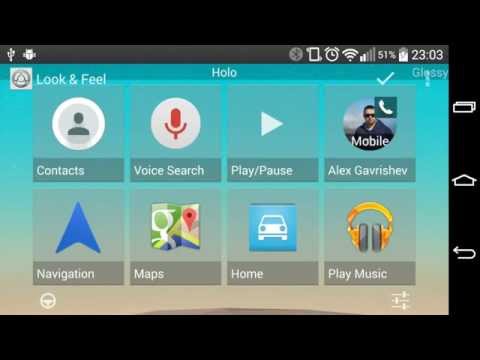
Screenshots of Car Widget
  • Car Widget
  • Car Widget
  • Car Widget
  • Car Widget
  • Car Widget
  • Car Widget
  • Car Widget
  • Car Widget
  • Car Widget
  • Car Widget
  • Car Widget
  • Car Widget
  • Car Widget
  • Car Widget
  • Car Widget
Description of Car Widget (from google play)

"Car Widget" makes easier and quicker access to phone features when you're in the car.
With the widget you can assign one or more screens on your home launcher to be dedicated for usage inside the car.

Unlike Car Home applications, you still will have access to all other screens of your home launcher.

To access widget settings use application shortcut.

HOW TO USE
On any home screen press "menu", then "add", select "widgets" and choose "Car Widget" from the list of available widgets.
You might need to restart the device in order to widget to appear in the list.

Main features:
* 4x4 widget
* 4,6 or 8 big shortcuts per widget
* 5 Skins
* Customization options: background color, opacity, font size and color, icons tint
* Replacement for "Car Dock" / "Car Home" applications.
* Custom icons and titles for shortcuts
* Icon pack support

Available shortcuts (can be expanded by installed applications):
* Applications
* Bookmark
* Contact
* Direct dial/ message
* Directions & Navigation (Using Google Maps)
* Gmail label
* Music playlist
* Settings
* Built-In Shortcuts - (InCar switch, Play/Pause, Next, Previous - Experimental)

Free version includes Trial of the features available in the Car Widget Pro.

Car Widget Pro features:
Automation for your car. Detects when you inside the car and adjusts settings of your phone.

Trigger (possible to combine all of the options):
* Power cable connected
* Headphones connected
* Bluetooth device connected
* Activity recognition

Actions:
* Turn on Bluetooth
* Disable screen timeout
* Adjust screen brightness
* Adjust volume level of media
* Switch off Wi-Fi
* Route call to speaker
* Auto answer (Experimental)
* Autorun App
* Shortcuts in notification bar (Android 4.0)

Limitations:
- It's not possible to unlock the screen from widget
- It's not possible to switch to the specific screen from widget
- Not possible to switch GPS

Permissions:
CALL_PHONE (Directly call phone numbers)- used for direct call shortcut
WAKE_LOCK (Prevent phone from sleeping) - used to disable screen timeout
WRITE_SETTINGS (Modify system settings)- used to adjust brightness settings
ACCESS_WIFI_STATE and CHANGE_WIFI_STATE - connect and disconnect from Wi-Fi
BLUETOOTH and BLUETOOTH_ADMIN - required in order to switch Bluetooth state
(Modify or delete the contents of your USB storage) - Backup/Restore functionality

Tips:
* On some devices you have option "Stay awake" (Under Settings -> Applications -> Development), you can enable it if your want to prevent phone from sleeping.

* Landscape mode: Not all launchers allow to use phone in landscape mode, just replace yours with alternative one that supports it (like LauncherPro or ADW).

You can find Car Widget Pro also in androidpit.com market.
(This marketplace has an option for PayPal)

IMPORTANT
Please exercise caution when using this application and do not manipulate your device while driving. Always pay attention to the road.

Version history Car Widget
New in Car Widget 3.4.2
Version 3.4.2 — targetSdk 37, updated baseline profile, bug fixes and performance improvements.
Advertisement
Please rate this app
More info
Select the Car Widget APK that fits your device

Android Version Requirements for Car Widget

How the minimum Android version needed by Car Widget has changed across the versions in the apk.gold catalog. Tap a point on the chart to check a specific version.

3.4.2Nov 18, 2026Android 12+, target 17
Minimum AndroidTarget Android

The current Car Widget 3.4.2 runs on Android 12 and later and targets Android 17. In 2017, version 1.9.3 needed only Android 4.0.3.

Phone on an older Android? Newest versions that still work: Android 10: 3.2.0 (Dec 2024); Android 5.0: 2.1.6 (Nov 2020).

Other Car Widget APK versions for Android
Popular android apps
  • icon YouTube
    YouTube
    version: 21.46.528
    updated: Nov 21 2026
    rating: ★7.5/10
  • icon KineMaster
    KineMaster
    version: 8.2.19.37530.GP
    updated: Nov 20 2026
    rating: ★8.9/10
  • icon YTV Player Pro
    YTV Player Pro
    version: 15.0
    updated: May 28 2026
    rating: ★8.4/10
  • icon MX Player
    MX Player
    version: 3.5.3
    updated: Nov 17 2026
    rating: ★8.5/10
  • icon PureStatus: ByeBye Blur Status
    PureStatus: ByeBye Blur Status
    version: 2026.25
    updated: Nov 03 2026
    rating: ★9.1/10
  • icon VLC
    VLC
    version: 3.7.2
    updated: Oct 30 2026
    rating: ★8.1/10
  • icon xnxx
    xnxx
    version: 1.0.5
    updated: Apr 10 2022
    rating: ★0/10
  • icon X Sexy Video Downloader
    X Sexy Video Downloader
    version: v-1.51
    updated: Oct 19 2026
    rating: ★8.9/10
  • icon IPTV
    IPTV
    version: 9.0.13
    updated: Mar 27 2025
    rating: ★8.8/10
  • icon YouTube Studio
    YouTube Studio
    version: 26.47.000
    updated: Nov 20 2026
    rating: ★8.6/10
  • icon Kwai
    Kwai
    version: 13.10.20.647201
    updated: Nov 18 2026
    rating: ★8/10
  • icon AW Player
    AW Player
    version: 3.4
    updated: Sep 13 2026
    rating: ★6.3/10
  • icon YouTube Create: Video editor
    YouTube Create: Video editor
    version: 0.229.540
    updated: Nov 20 2026
    rating: ★9.3/10
  • icon Alight Motion
    Alight Motion
    version: 5.0.273.1028425
    updated: May 24 2026
    rating: ★7.9/10
  • icon XNX Video Downloader
    XNX Video Downloader
    version: 1.0
    updated: Jan 12 2021
    rating: ★7.8/10
  • icon AI Video Editor - VivaCut
    AI Video Editor - VivaCut
    version: 4.5.4
    updated: Nov 08 2026
    rating: ★8.6/10
  • icon XP IPTV
    XP IPTV
    version: 4.1.6
    updated: Aug 31 2026
    rating: ★8.5/10
  • icon EZVIZ
    EZVIZ
    version: 7.6.9.1104
    updated: Nov 19 2026
    rating: ★9.4/10
  • icon Likee-Live, Chat & Party Games
    Likee-Live, Chat & Party Games
    version: 5.68.0
    updated: Nov 18 2026
    rating: ★8.7/10
  • icon ProgTV Android
    ProgTV Android
    version: 2.94.0
    updated: Aug 29 2026
    rating: ★8.4/10
  • icon GENRAL PRO
    GENRAL PRO
    version: 2.5
    updated: Nov 14 2025
    rating: ★9.8/10
  • icon PLAYit
    PLAYit
    version: 2.7.55.1
    updated: Nov 18 2026
    rating: ★9.1/10
  • icon USB Camera
    USB Camera
    version: 12.3.5
    updated: Nov 18 2026
    rating: ★6/10
  • icon Gee Sports Tv
    Gee Sports Tv
    version: 1.4
    updated: May 09 2026
    rating: ★0/10